Utilities
scrollkit.utils collects small, dependency-light helpers used across the
library.
| Module | What it offers |
|---|---|
utils.color_utils |
colors — a small Title-case-name → hex-string table consumed by the settings schema (color math itself now lives in display.colors) |
utils.error_handler |
ErrorHandler — centralised logging with file persistence |
utils.system_utils |
NTP / HTTP-Date system clock sync (set_system_clock) |
utils.url_utils |
credential loading from secrets.py |
Colour helpers
from scrollkit.utils.color_utils import ColorUtils

ColorUtils.colors["Orange"]   # "0xffa500" — used as a settings default
For actual colour math (hex/int conversion, brightness scaling, gradients), see
Colour generators below (scrollkit.display.colors) — the
current, correct API.
Error logging
from scrollkit.utils.error_handler import ErrorHandler

log = ErrorHandler("error_log")
log.error(exception, "context message")
ErrorHandler writes to a log file when the filesystem is writable and degrades
gracefully when it isn't (e.g. a read-only CircuitPython filesystem).
Colour generators
scrollkit.display.colors exposes the full 24-bit colour space as continuous
generators (device-safe integer math) rather than a fixed catalogue of named
palettes — sample exactly the ramp you want, at the resolution the panel can show.
Build a ramp once (at import or effect construction) and reuse it; none of these
belong in a per-frame loop.
from scrollkit.display.colors import spectrum, gradient, multi_gradient, depth_palette

spectrum(16)                                        # 16 hues around the wheel
gradient(0x102840, 0x00CCFF, 16)                    # deep blue -> cyan
multi_gradient((0x330000, 0xFF4400, 0xFFF0A0), 16)  # a fire ramp
depth_palette(0x66CCFF, strength=0.55)              # a close "lit from above" ramp
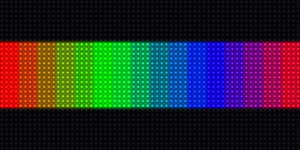
spectrum(16)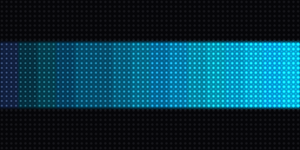
gradient(...)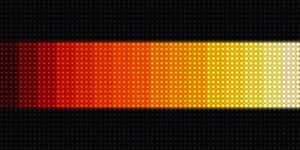
multi_gradient(...)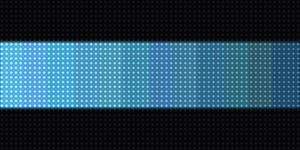
depth_palette(...)hsv(h, s, v), wheel(pos), scale(color, factor) and lerp(a, b, t) round out the
set for single-colour needs. For the 16 named colours used by the minimal API:
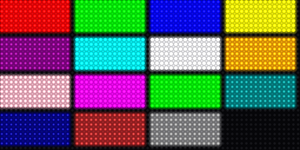
Feed any of these straight to a gradient text fill
(palette=...).
ActScheduler (0.9.0)
For signs that run 24/7, plain randomness repeats itself. ActScheduler
draws from decks of (name, family, payload) entries so nothing whose
visual family just played is picked, and the least-recently-seen material
surfaces first (weight (age+1)^2; new entries start old, so fresh
material leads):
from scrollkit.utils.scheduler import ActScheduler

sched = ActScheduler()
name, family, run = sched.pick(BUILDS, "builds", avoid=last_families)
name, family, run = sched.pick(BUILDS, "builds", force="hunt")  # an opener
Ages are kept per deck key, so one instance schedules independent decks (builds, dwell treatments, exits, layouts...).
cold_reset (0.9.2)
A microcontroller.reset() issued while the WiFi station is associated
carries warm radio state into the next session — which then degrades until
new outbound connects fail OSError: 16 while pooled keep-alive flows keep
working (see the radio bounce).
cold_reset() disables the radio, lets the driver settle, then resets:
from scrollkit.utils.system_utils import cold_reset
cold_reset()    # never returns on CircuitPython
Every deliberate reboot inside the library (OTA apply, the auto-reboot
watchdog, WiFiManager.reset()) already goes through it; use it for your
app's own reboot paths (web-triggered restarts, crash handlers) instead of a
raw microcontroller.reset().