Gradient Text
By default the text classes draw in one flat colour — a displayio Label is
physically a single-colour bitmap. Pass a palette to StaticText or
ScrollingText and the text is filled with a gradient instead, in the same
font your normal text already uses. It's a subtle way to add depth and interest
without it looking garish.
from scrollkit.display.content import ScrollingText
from scrollkit.display.colors import depth_palette

# One base colour + a subtlety knob -> a tasteful close ramp ("lit from above"):
ScrollingText("DEPARTURES", y=12, palette=depth_palette(0x66CCFF, strength=0.45))
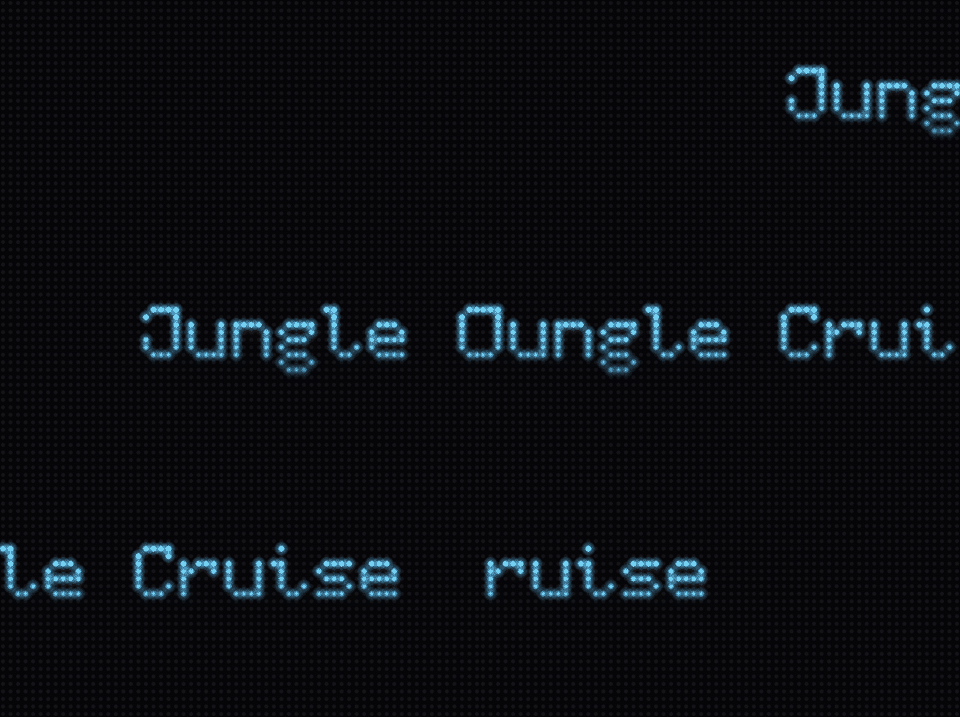
When palette is set, the flat color is ignored. With palette=None (the
default) nothing changes — you get the original fast single-colour path,
untouched.
The three forms
from scrollkit.display.content import StaticText, ScrollingText
from scrollkit.display.colors import depth_palette, multi_gradient

# 1) Two colours: a straight gradient from the first to the second.
StaticText("ON TIME", x=8, y=12, palette=(0xA0FFC0, 0x205038))

# 2) Several stops: a multi-stop gradient across the phrase.
ScrollingText("SCROLLKIT", y=12, direction="horizontal",
              palette=multi_gradient((0x102840, 0x2060A0, 0x66CCFF), 12))

# 3) One colour: depth_palette() derives the close second shade for you.
ScrollingText("NEXT TRAIN", y=12, palette=depth_palette(0x66CCFF))
depth_palette(color, strength=0.4) (in scrollkit.display.colors) returns
(color, darker_shade) — the highlight you pass and a shadow scaled down by
strength. It's a colour transform, not a named palette, so it fits the
library's "generate any colour, name none" philosophy. For full control, build a
ramp yourself with gradient, multi_gradient, hsv, or spectrum (see
Colours).
Direction
direction chooses the axis the ramp runs along — the same vocabulary
SwarmReveal uses:
direction |
Ramp runs | Reads as |
|---|---|---|
"vertical" (default) |
top → bottom | depth / "lit from above" — the subtle win |
"horizontal" |
left → right across the whole phrase | a colour sweep / decoration |
"diagonal" |
top-left → bottom-right | something between the two |
The same word filled along each axis (a vivid 3-stop ramp, so the direction is obvious — in practice two close colours read as subtle depth):
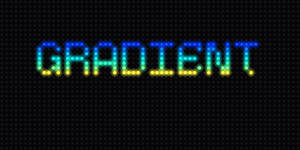
"vertical"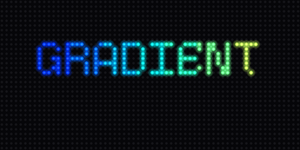
"horizontal"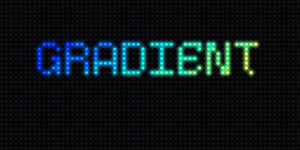
"diagonal"To reverse a direction, reverse the palette tuple (e.g.
palette=(shadow, highlight)) — there is no "vertical_reverse" name on purpose.
palette_steps (default 8) sets how many ramp colours are generated from the
stops; it's clamped to 2..15 so the indexed bitmap stays at 4 bits/pixel.
Vertical is the depth look
For "depth and interest without being garish", reach for direction="vertical"
with two close colours (or just depth_palette). A top-light → bottom-dark
shade makes flat 7-pixel-tall text read as if it has dimension. Horizontal and
multi-hue ramps are more decorative.
It scrolls with the letters
A gradient ScrollingText scrolls exactly like a flat one — and it's actually
cheaper per frame. The glyphs are rasterised once into an indexed Bitmap
whose every lit pixel carries a palette index for its position; the text then
scrolls by moving a TileGrid (zero per-frame pixel writes, no glyph rebuild).
Because the colour is baked into each pixel's position within the text, the gradient is locked to the letters and travels with them — a vertical shade stays attached to each glyph as it scrolls by. (If you instead want a fixed on-screen sheen the letters pass through, that's the animated path — see below.)
Static fill vs. animated palette
Gradient text is a static fill. For text whose colours move — a rainbow
chase, a metallic sheen sweeping across — use
BitmapText + a palette_effect, which animates the palette
each frame. The two are deliberately separate concepts:
Gradient StaticText / ScrollingText |
BitmapText + palette_effect |
|
|---|---|---|
| Colour | static ramp, locked to the letters | animated each frame |
| Font | your normal display font (terminalio) | the ScrollKit 5×7 block font |
| Use it for | subtle depth, tasteful two-tone | rainbow chase, neon, chrome sheen |
Building it directly: GradientTextLayer
StaticText / ScrollingText drive GradientTextLayer internally via their
palette= argument — that covers the common case. Reach for the class directly
when you need custom positioning or animation that those two don't expose (for
example, driving .x from your own scroll/physics loop instead of a fixed speed):
from scrollkit.display.gradient_text import GradientTextLayer

layer = GradientTextLayer("NEXT TRAIN", y=12, palette=(0x66CCFF, 0x1C3D66),
                           direction="vertical", palette_steps=8)
layer.build(display)          # rasterise once, add as a layer
layer.x = 40                  # reposition any frame (no rebuild)
print(layer.width)            # rasterised width in pixels
layer.detach(display)         # remove when done (idempotent)
Colours (no named palettes)
The colour helpers in scrollkit.display.colors are continuous generators — sample
the full 24-bit space at whatever resolution you want, rather than picking from a
fixed list:
from scrollkit.display.colors import gradient, multi_gradient, hsv, spectrum, scale

gradient(0x102840, 0x00CCFF, 8)                       # deep blue -> cyan, 8 steps
multi_gradient((0x330000, 0xFF4400, 0xFFF0A0), 12)    # a fire ramp
depth_palette(0xFFE08A, strength=0.5)                 # warm amber with depth
A note on the 4-bit panel (banding)
At the default bit_depth=4 the MatrixPortal S3 panel is RGB444 — 16 levels
per channel. A gradient between two very close colours can collapse to one or two
visible steps on the real panel, and a vertical gradient over a ~7-pixel-tall glyph
only has ~7 rows to work with. The simulator previews finer (RGB565) than the
panel shows, so a gradient that looks silky on the desktop can band on hardware.
Practical guidance:
- For visible-but-subtle, let at least one channel move by ~
0x20or more. - Brightness ramps (what
depth_paletteproduces) survive RGB444 better than tiny hue shifts. - Don't raise
bit_depthto 6 just for smoother gradients — it roughly triples the refresh cost.
Feasibility
Both StaticText and ScrollingText carry a FEASIBILITY budget reporting
zero per-frame pixel writes and no per-frame allocation (the rasterise +
index-map is paid once, on the first frame). Verify any app with
run_headless(app, strict=True) from scrollkit.dev.